OpenPGP and GnuPG
SecTrustKey is an OpenPGP card (version 3.4) for GnuPG. Its private keys are generated on the device and never leave it.
| Supported | |
|---|---|
| Curves | Ed25519 / X25519, NIST P-256, P-384, P-521, secp256k1, Brainpool P-256/384/512 |
| RSA | 2048, 3072, 4096 (generation is slow on this chip) |
| Keys | Signature, decryption, authentication |
| Touch policy | Per key (uif), shown as an OpenPGP confirm prompt |
Linux: let pcscd see the reader
pcscd only talks to readers its CCID driver lists, and the stock list does not include SecTrustKey's USB ID. Add it once:
Append one entry at the end of each of these three arrays, keeping them in the same order:
<key>ifdVendorID</key>      <!-- add: --> <string>0x2E8A</string>
<key>ifdProductID</key>     <!-- add: --> <string>0x10FE</string>
<key>ifdFriendlyName</key>  <!-- add: --> <string>SecTrustKey</string>
Note
The file's location differs between distributions (/usr/lib64/… or /usr/libexec/…), and a package update can overwrite it. If you built with your own USB identity, use that ID.
Change the PINs
$ gpg --card-edit
gpg/card> admin
gpg/card> passwd
   1 - change PIN               (user PIN, 6+ characters, factory 123456)
   3 - change Admin PIN         (8+ characters, factory 12345678)
   4 - set the Reset Code
\"Bad PIN\" with no try used
If gpg says Bad PIN while you change a PIN, but the retry counter in gpg --card-status did not drop, the new PIN was too short. OpenPGP needs at least 6 characters for the user PIN and 8 for the admin PIN. A wrong current PIN does lower the counter; after 3 wrong user PINs, unblock it with the admin PIN (passwd, option 2).
Generate keys on the device
Pick the key type first. GnuPG lists every curve only in expert mode. Curve 25519 is the recommended modern choice:
$ gpg --expert --card-edit
gpg/card> admin
gpg/card> key-attr        # 2 = ECC, then 1 = Curve 25519, for each of the three keys
gpg/card> generate        # answer "n" to the off-card backup question to keep keys on the device only
Check the result with gpg --card-status: the three keys show as ed25519, cv25519 and ed25519, with a > after sec/ssb meaning "on card".
Require a key press
gpg/card> uif 1 on    # signing
gpg/card> uif 2 on    # decryption
gpg/card> uif 3 on    # authentication (SSH)
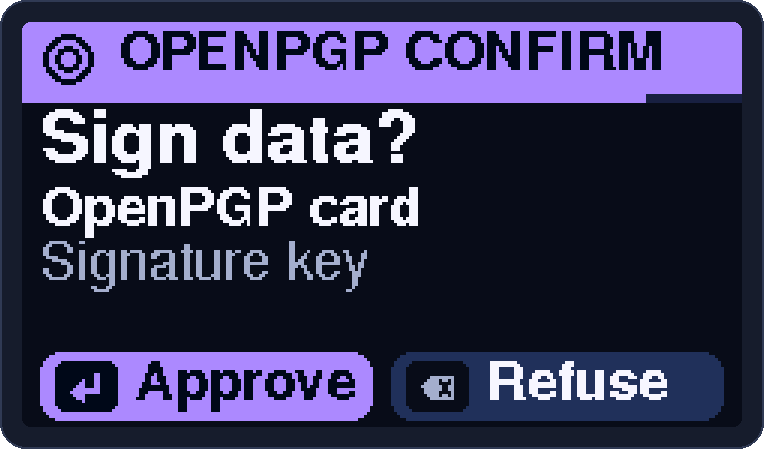
Each use then shows the violet OpenPGP confirm prompt and waits for Enter.
Reset OpenPGP
gpg --card-edit, admin, factory-reset erases the OpenPGP keys and restores the factory PINs. FIDO, PIV and OATH data are not affected.