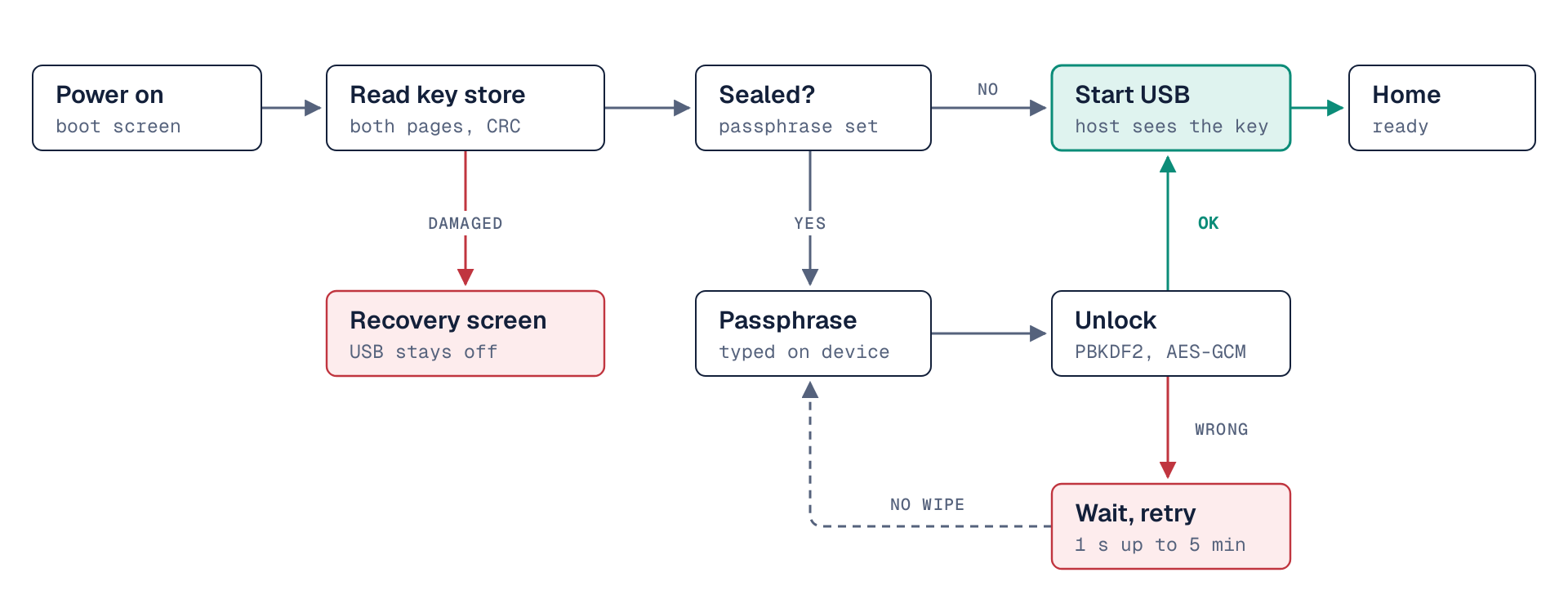
USB starts only once the keys are available and healthy, so a computer never sees a half-ready key.
Power on. The boot screen appears while the display, keyboard and storage start.
Read the key store. Both pages are read and checked; the newest valid record wins. A fresh device creates its master keys here.
Sealed? Without a passphrase, USB starts and the home screen appears.
Passphrase. With a passphrase, the device asks for it on its own keyboard. The key is derived with PBKDF2 and the record is opened with AES-256-GCM.
Wrong passphrase. Nothing is erased. After the third wrong try the device waits 1 s, then 2 s, 4 s … up to 5 minutes before the next one, and the count survives power cycles.
Damaged storage. If the key store or file store cannot be read safely, the device opens a recovery screen and keeps USB off. Restore an SD backup, or erase and reflash.